PlayStation Portal

Designing the system software for a handheld that streams your PS5 games over Wi-Fi.

ROLE
Senior UX Designer
COMPANY
PlayStation
RELEASE
November 2023
PLATFORM
Handheld · Controller + touch

Overview

I was one of four core designers on Portal’s system software, from before the hardware existed through launch. In 2024, it was the best-selling PS5 accessory in the U.S. by dollar sales.

Context

The challenge

The problem

PS5 interactions were designed for a TV and the DualSense controller. Portal needed to bring that familiar experience to an 8-inch handheld, with controller navigation and touch interactions working together.

The goal

Create a consistent system that feels like PlayStation, makes connecting easy, and gives players clear feedback when something interrupts their game.

Constraints

At launch, games streamed from the player’s PS5, so connection state and recovery shaped much of the experience. Screens also had to stay clear and usable on a smaller display held in two hands.

SCOPE

What we designed

Our team designed six core surfaces on a shared design system. I owned Settings end to end and contributed to Quick Menu, Remote Play, setup guidance, connection messaging, lock screen motion, and global patterns.

Initial setup

Connecting to your PS5 and first-use guidance.

Lock screen

Waking and unlocking Portal.

Home screen

Connecting, ready to play, and idle states.

Quick Menu

Connection, audio, and device controls.

Remote Play

Gameplay with on-screen touchpad controls.

Settings

Network, system, display, and controller settings.

Design system

Patterns and components

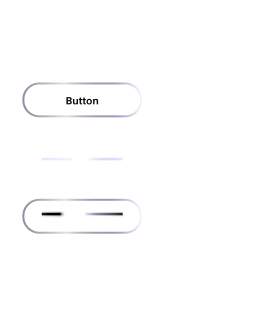
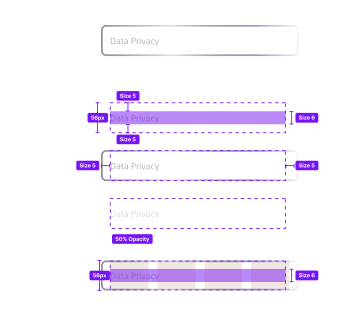
I worked on shared patterns for controller and touch, including buttons, list links adapted from PS5, and a universal header that handled connected and disconnected states. I also wrote specs and partnered with engineering on visual QA.
Button states
Button states
List links
List links
Header variants
Header variants

Quick Menu button states

Quick Menu control state 1
Quick Menu control state 2
Quick Menu control state 3
Quick Menu control state 4
Quick Menu control state 5
Quick Menu control state 6
CORE SCREENS

Settings

Settings had to work as well with a thumb as with a controller. I designed the main screen around four large tiles, put sign-out two presses from the top, and adapted familiar PS5 patterns for the deeper screens.

Quick Menu

Players needed access to system controls without losing sight of their game. I worked on Quick Menu’s visual design, interactions, and focus states, with engineering specs for spacing, typography, and alerts.

Setup and connection

Portal could only connect if Remote Play was enabled on the player’s PS5, and many players had it turned off. I designed guidance to help them turn it on, and onboarding that introduced Quick Menu. With the team, I also defined where connection status appeared and wrote the progress messages.

My proposal shipped: Portal reconnects on its own when Wi-Fi drops.

Lock screen

The lock screen needed to feel ready to play, even while locked. I helped finalize its visual design and created motion specs for its entrance, idle pulse, and exit in After Effects and Figma.

Additional explorations

Outcome

Launch and results

Portal launched in November 2023. My shipped work included Settings end to end, Remote Play setup guidance, lock screen motion, and shared components. I also proposed automatic reconnection after Wi-Fi drops, which shipped. After launch, my wireframes led to per-side touchpad activation, which also shipped. In 2024, Portal was the best-selling PS5 accessory in the U.S. by dollar sales.

Source: Circana / Push Square
After launch

Playtests and Cloud Streaming

Our team partnered with UX Research on playtests with Portal owners. They showed the touchpad wasn’t always easy to find or use, so I explored fixes in wireframes. One of them, per-side touchpad activation, shipped in a later update.

I also co-led early concepts for cloud streaming with our lead designer, covering entry points, the journey from Home to a game, the game catalog, and game pages. That work helped shape the direction of the feature.

Reflection

What I learned

I joined Portal as a strong visual designer and left a much stronger interaction designer. Working closely with other designers taught me to think in focus, states, and complete flows. Post-launch playtests showed that gestures familiar to our team weren’t always clear to players. Now I plan for discoverability and recovery from the start.

Companion App

PlayStation Portal

Designing the system software for a handheld that streams your PS5 games over Wi-Fi.

ROLE
Senior UX Designer
COMPANY
PlayStation
RELEASE
November 2023
PLATFORM
Handheld · Controller + touch

Overview

I was one of four core designers on Portal’s system software, from before the hardware existed through launch. In 2024, it was the best-selling PS5 accessory in the U.S. by dollar sales.

Context

The challenge

The problem

PS5 interactions were designed for a TV and the DualSense controller. Portal needed to bring that familiar experience to an 8-inch handheld, with controller navigation and touch interactions working together.

The goal

Create a consistent system that feels like PlayStation, makes connecting easy, and gives players clear feedback when something interrupts their game.

Constraints

At launch, games streamed from the player’s PS5, so connection state and recovery shaped much of the experience. Screens also had to stay clear and usable on a smaller display held in two hands.

SCOPE

What we designed

Our team designed six core surfaces on a shared design system. I owned Settings end to end and contributed to Quick Menu, Remote Play, setup guidance, connection messaging, lock screen motion, and global patterns.

Initial setup

Connecting to your PS5 and first-use guidance.

Lock screen

Waking and unlocking Portal.

Home screen

Connecting, ready to play, and idle states.

Quick Menu

Connection, audio, and device controls.

Remote Play

Gameplay with on-screen touchpad controls.

Settings

Network, system, display, and controller settings.

Design system

Patterns and components

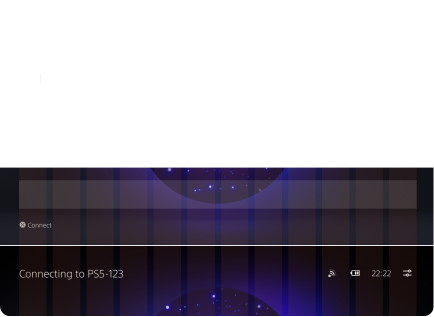
I worked on shared patterns for controller and touch, including buttons, list links adapted from PS5, and a universal header that handled connected and disconnected states. I also wrote specs and partnered with engineering on visual QA.
Button states
Button states
List links
List links
Header variants
Header variants

Quick Menu button states

Quick Menu control state 1
Quick Menu control state 2
Quick Menu control state 3
Quick Menu control state 4
Quick Menu control state 5
Quick Menu control state 6
CORE SCREENS

Settings

Settings had to work as well with a thumb as with a controller. I designed the main screen around four large tiles, put sign-out two presses from the top, and adapted familiar PS5 patterns for the deeper screens.

Quick Menu

Players needed access to system controls without losing sight of their game. I worked on Quick Menu’s visual design, interactions, and focus states, with engineering specs for spacing, typography, and alerts.

Setup and connection

Portal could only connect if Remote Play was enabled on the player’s PS5, and many players had it turned off. I designed guidance to help them turn it on, and onboarding that introduced Quick Menu. With the team, I also defined where connection status appeared and wrote the progress messages.

My proposal shipped: Portal reconnects on its own when Wi-Fi drops.

Lock screen

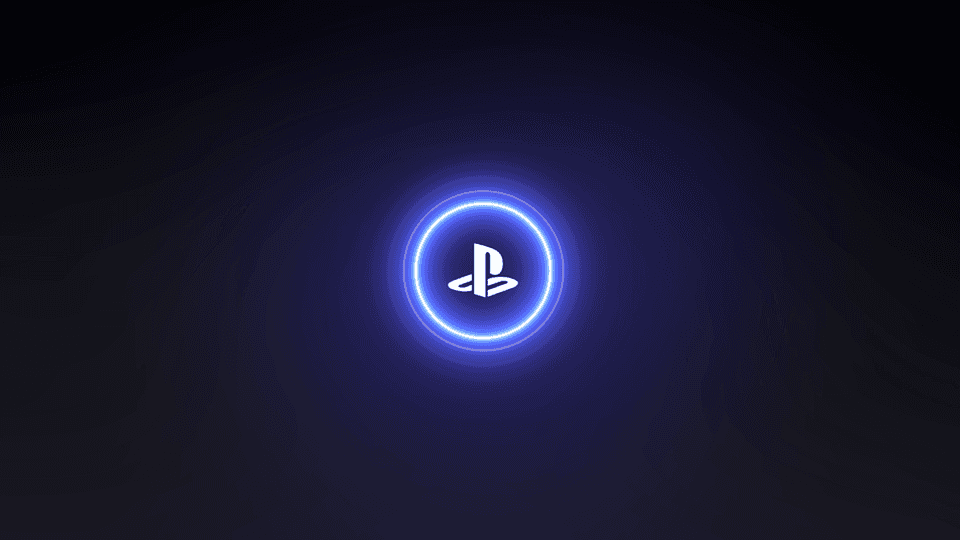
The lock screen needed to feel ready to play, even while locked. I helped finalize its visual design and created motion specs for its entrance, idle pulse, and exit in After Effects and Figma.
Additional explorations

Outcome

Launch and results

Portal launched in November 2023. My shipped work included Settings end to end, Remote Play setup guidance, lock screen motion, and shared components. I also proposed automatic reconnection after Wi-Fi drops, which shipped. After launch, my wireframes led to per-side touchpad activation, which also shipped. In 2024, Portal was the best-selling PS5 accessory in the U.S. by dollar sales.

Source: Circana / Push Square
After launch

Playtests and Cloud Streaming

Our team partnered with UX Research on playtests with Portal owners. They showed the touchpad wasn’t always easy to find or use, so I explored fixes in wireframes. One of them, per-side touchpad activation, shipped in a later update.

I also co-led early concepts for cloud streaming with our lead designer, covering entry points, the journey from Home to a game, the game catalog, and game pages. That work helped shape the direction of the feature.

Reflection

What I learned

I joined Portal as a strong visual designer and left a much stronger interaction designer. Working closely with other designers taught me to think in focus, states, and complete flows. Post-launch playtests showed that gestures familiar to our team weren’t always clear to players. Now I plan for discoverability and recovery from the start.

Companion App

PlayStation Portal

Designing the system software for a handheld that streams your PS5 games over Wi-Fi.

ROLE
Senior UX Designer
COMPANY
PlayStation
RELEASE
November 2023
PLATFORM
Handheld · Controller + touch

Overview

I was one of four core designers on Portal’s system software, from before the hardware existed through launch. In 2024, it was the best-selling PS5 accessory in the U.S. by dollar sales.

Context

The challenge

The problem

PS5 interactions were designed for a TV and the DualSense controller. Portal needed to bring that familiar experience to an 8-inch handheld, with controller navigation and touch interactions working together.

The goal

Create a consistent system that feels like PlayStation, makes connecting easy, and gives players clear feedback when something interrupts their game.

Constraints

At launch, games streamed from the player’s PS5, so connection state and recovery shaped much of the experience. Screens also had to stay clear and usable on a smaller display held in two hands.

SCOPE

What we designed

Our team designed six core surfaces on a shared design system. I owned Settings end to end and contributed to Quick Menu, Remote Play, setup guidance, connection messaging, lock screen motion, and global patterns.

Initial setup

Connecting to your PS5 and first-use guidance.

Lock screen

Waking and unlocking Portal.

Home screen

Connecting, ready to play, and idle states.

Quick Menu

Connection, audio, and device controls.

Remote Play

Gameplay with on-screen touchpad controls.

Settings

Network, system, display, and controller settings.

Design system

Patterns and components

I worked on shared patterns for controller and touch, including buttons, list links adapted from PS5, and a universal header that handled connected and disconnected states. I also wrote specs and partnered with engineering on visual QA.

Button states
Button states
List links
List links
Header variants
Header variants

Quick Menu button states

Quick Menu control state 1
Quick Menu control state 2
Quick Menu control state 3
Quick Menu control state 4
Quick Menu control state 5
Quick Menu control state 6
CORE SCREENS

Settings

Settings had to work as well with a thumb as with a controller. I designed the main screen around four large tiles, put sign-out two presses from the top, and adapted familiar PS5 patterns for the deeper screens.

Quick Menu

Players needed access to system controls without losing sight of their game. I worked on Quick Menu’s visual design, interactions, and focus states, with engineering specs for spacing, typography, and alerts.

Setup and connection

Portal could only connect if Remote Play was enabled on the player’s PS5, and many players had it turned off. I designed guidance to help them turn it on, and onboarding that introduced Quick Menu. With the team, I also defined where connection status appeared and wrote the progress messages.

My proposal shipped: Portal reconnects on its own when Wi-Fi drops.

Lock screen

The lock screen needed to feel ready to play, even while locked. I helped finalize its visual design and created motion specs for its entrance, idle pulse, and exit in After Effects and Figma.

Additional explorations

Outcome

Launch and results

Portal launched in November 2023. My shipped work included Settings end to end, Remote Play setup guidance, lock screen motion, and shared components. I also proposed automatic reconnection after Wi-Fi drops, which shipped. After launch, my wireframes led to per-side touchpad activation, which also shipped. In 2024, Portal was the best-selling PS5 accessory in the U.S. by dollar sales.

Source: Circana / Push Square
After launch

Playtests and Cloud Streaming

Our team partnered with UX Research on playtests with Portal owners. They showed the touchpad wasn’t always easy to find or use, so I explored fixes in wireframes. One of them, per-side touchpad activation, shipped in a later update.

I also co-led early concepts for cloud streaming with our lead designer, covering entry points, the journey from Home to a game, the game catalog, and game pages. That work helped shape the direction of the feature.

Reflection

What I learned

I joined Portal as a strong visual designer and left a much stronger interaction designer. Working closely with other designers taught me to think in focus, states, and complete flows. Post-launch playtests showed that gestures familiar to our team weren’t always clear to players. Now I plan for discoverability and recovery from the start.

Companion App